Yolov5 버전 git clone해서 가져옵니다.
!git clone "https://github.com/ultralytics/yolov5.git"Yolov5 버전에 맞춰 요구사항을 다운로드합니다.
!pip3 install -r /content/yolov5/requirements.txt본격적으로 학습하기에 앞서 data.yml 파일을 작성합니다.
import yaml
import os

path = '/content/yolov5/data'
data = { }

data['train'] = path+'/images/train'
data['val'] = path+'/images/valid'
data['test'] = path+'/images/test'
data['nc'] = '4'
data['names'] = ['plastic_bag','paper','petbottle','plastic']
with open(path +'/data.yaml', 'w') as f:
  yaml.dump(data, f)

print(data)
학습을 시킬 이미지 데이터와 라벨링 데이터를 가져오기 전에 yolov5을 gi clone하면서
image 파일내에 임시로 저장된 이미지는 필요가 없으니 삭제합니다.
import os

path = "/content/yolov5/data/images"
file_list = os.listdir(path)

os.remove(path+"/"+file_list[0])
os.remove(path+"/"+file_list[1])

!rm -r /content/yolov5/data/images
git clone을 통해 학습을 시킬 이미지 데이터와 라벨링 데이터를 가져옵니다.
1. images
2. labels
두 개의 폴더를 하기의 그림 속 구조처럼 만들기 위해 다음의 경로로 이동시킵니다.
/content/yolov5/data
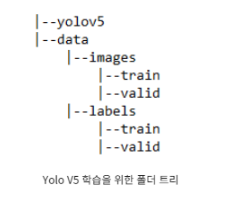
!git clone https://github.com/SeolRoh/AI_Competition_Dataset-.git

!mv /content/AI_Competition_Dataset-/images /content/yolov5/data

!mv /content/AI_Competition_Dataset-/labels /content/yolov5/data
학습 시킬 모든 준비가 완료되었습니다.
이제 학습을 시켜봅시다.
epochs 값을 수정한 후 에 실행해주세요.
!rm -r /content/yolov5/runs/train
!python /content/yolov5/train.py --img 640 --batch 32 --epochs 25 --data '/content/yolov5/data/data.yaml' --cache --cfg '/content/yolov5/models/yolov5s.yaml' --weights yolov5s.pt --name 'learning'
자! 이제 학습이 완료 되었습니다!
detect된 결과를 이미지로 확인해 봅니다.
from IPython.display import Image

Image('/content/yolov5/runs/train/learning/val_batch0_labels.jpg')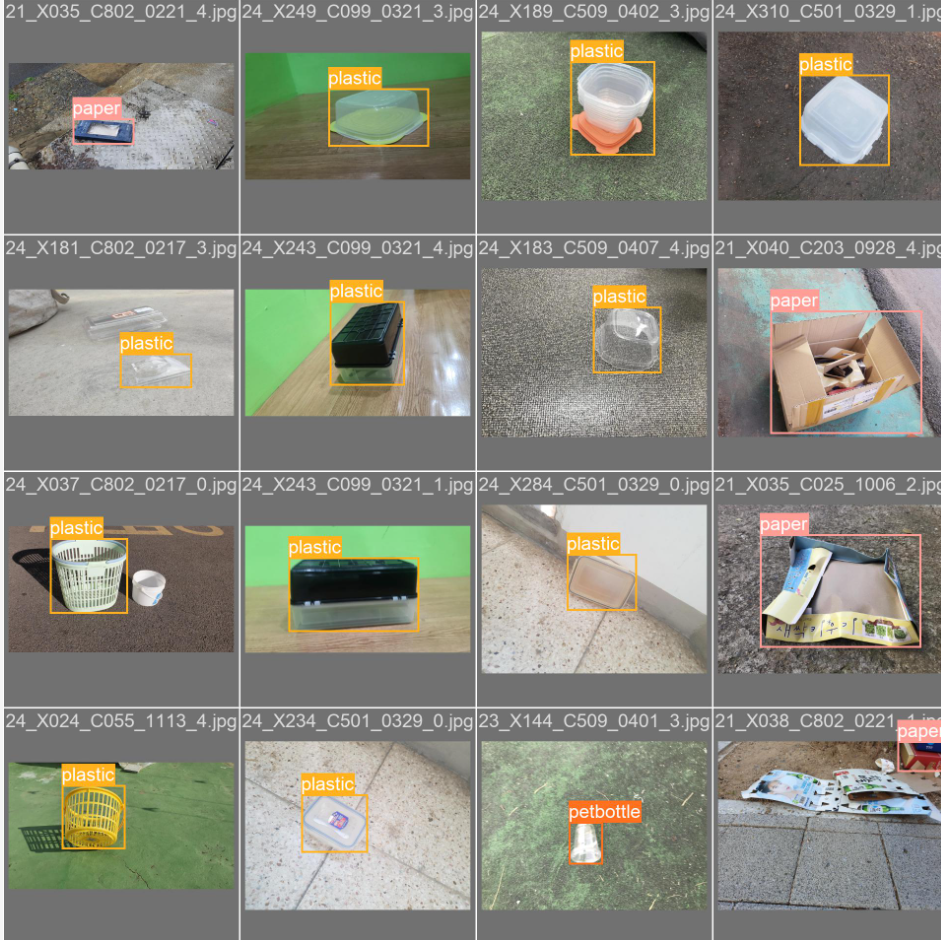
test 디렉토리내 test 파일을 통해 학습된 model이 어떻게 detect 되는지 확인해 봅시다.
!rm -r /content/yolov5/runs/detect #!rm -r /content/yolov5/runs_flammable_object
!rm -r /content/yolov5/runs_flammable_object
#!rm -r /content/yolov5/runs/train/learning

!python3 /content/yolov5/detect.py --weights '/content/yolov5/runs/train/learning/weights/best.pt' --source '/content/yolov5/data/images/test' --save-txt
test이미지 파일을 통해 결과 데이터로 저장합니다.
채점을 하기 위해 "y_pred.csv"파일을 다운로드 하여 제출해주세요.
import os
import natsort
import pandas as pd
import numpy as np
import csv

file_list = os.listdir("/content/yolov5/data/images/test")
after_file_list = natsort.natsorted(file_list)

result_list = []

for a in range (len(after_file_list)):
  print(after_file_list[a].rstrip(".jpg")+".txt")

  path = "/content/yolov5/runs/detect/exp/labels"


  try:
    with open(path+"/"+after_file_list[a].rstrip(".jpg")+".txt", 'r') as file:
      strings = file.readlines()
      # print(strings)
      print(strings[0][0:1])
      result_list.append(strings[0][0:1])
  except FileNotFoundError:
     print('9')
     result_list.append('9')


print(result_list)
with open("y_pred.csv",'w') as file:
  writer = csv.writer(file)
  writer.writerows(result_list)