
::PaperSumGPT는 ChatGPT를 사용하여 긴 논문 내용을 줄여주는 도구입니다. 연구자와 학생분들이 학술 논문의 요점을 빠르게 이해할 수 있기를 기원합니다!::
📢 논문요약GPT의 프롬프트 설계에 관심이 있으시다면, 저희 팀의 이전 글 (https://aifactory.space/competition/2290/discussion/248)을 참고해주시기 바랍니다.
서비스 최종 목표
- ChatGPT 및 CLI를 이용하여 긴 논문 내용을 요약하는 서비스 제공
- 연구원, 학생, 일반인 등 논문 요약을 원하는 사람들이 쉽게 사용할 수 있도록 제작
- PDF / markdown / txt 등 다양한 인풋 파일 타입 지원
- 논문 요약 결과를 다양한 형태로 출력할 수 있도록 제작 (Stream / txt / markdown)
- 긴 분량의 논문을 자동 절삭하고, 반복 과정을 일련 자동화할 수 있도록 제작
리포지토리 다운로드 및 PaperSumGPT 서비스 설치 방법
상세한 설치 방법은 아래 깃헙 링크를 참고해주세요.
설치 도중 어려움이 있으시다면 언제든 댓글 남겨주시기 바랍니다 ☺️
- English: wjgoarxiv/PaperSumGPT: ::A tool to abbreviate scientific paper contents using ChatGPT:: (github.com)
- 한국어: PaperSumGPT/README-ko_kr.md at main · wjgoarxiv/PaperSumGPT (github.com)
배경
PaperSumGPT은 논문 내용을 요약하는 데 초점을 맞춘 리포입니다. 그러나 프롬프트 엔지니어링 글에서도 언급하였듯, 긴 분량의 논문을 ChatGPT에 입력하려면 긴 내용을 절삭하고, 반복적으로 프롬프트와 함께 ChatGPT에 보내는 과정이 필요합니다. 이는 곧 사용자로 하여금 잦은 피로감을 형성시킬 수 있습니다. 저희는 이 과정을 Python3 및 CLI 등을 이용하여 자동화해보면 어떨까 하여 해당 리포지토리와 서비스를 제작해보았습니다.
요약하고 싶은 논문 내용을 PDF, 마크다운, 혹은 텍스트 형태로 준비하세요.
PaperSumGPT 서비스는 논문 (혹은 칼럼, 긴 글)의 내용을 자동으로 분할, 절삭해주고, ChatGPT 웹 페이지에 자동적으로 반복 질문하는 것을 대신해줍니다. 이를 통해 대학원생 및 교수 분들이 많은 분량의 논문을 빠르게 읽고 핵심을 잡아내는 것이 가능해질 것이라 기대합니다.
서비스 형태
- 다운로드 가능한 GitHub 리포지토리
pip로 로컬 컴퓨터에 설치할 수 있도록 안내
⚠️ 본래 저희 팀의 의도는 Gradio 및 Colab 등을 활용하여 클릭 몇 번만으로 사용자가 논문 요약을 진행할 수 있게 하는 것이었습니다. 그러나, CLI 특성상 이와 같은 환경에서 논문 요약을 진행해 본 결과 속도 측면에서 상당히 불리하다는 것을 확인하였습니다 (특히, PDF를 입력 파일로 사용할 시 OCR (문자 인식) 과정이 매우 느려졌습니다). 오히려, 로컬 컴퓨터에서 리포를 다운 받아 구동하는 것이 매우 빠른 논문 요약이 가능함을 확인하였습니다. 이와 관련하여 의견을 주실 의향이 있으시다면, 댓글 남겨주시기 바랍니다:)
사용 방법
(1) 실행
설치를 성공적으로 진행하셨다면, 터미널에서 다음과 같이
papersumgpt만 입력하여도 프로그램이 실행됩니다.
(2) .pdf 파일로 논문 요약 진행하기
만약 현재 디렉토리에 입력 파일 (.txt, .md, .pdf)이 존재하지 않는다면,
------------------------------------------------
ERROR: There is no file in the current directory. Please check the current directory.
------------------------------------------------
가 출력됩니다. 프로그램이 input 파일을 인식할 수 있도록, 논문 파일을 현재 디렉토리에 놓아주세요. 그러면 다음과 같은 메시지가 출력됩니다.
INFO: Please type the number the file type that you want to use:

    1. Markdown (`.md`) file
    2. Plain text (`.txt`) file
    3. PDF (`.pdf`) file

    :
저희는 프롬프트 엔지니어링에서도 사용하였던 ChatGPT: A Meta-Analysis after 2.5 Months 논문을 인풋으로 사용하겠습니다. 저희는 미리 arxiv 사이트에서 .pdf 형태의 파일을 다운 받아 현재 디렉토리에 위치시켜놓은 상황입니다. 따라서 3을 입력하고 ENTER를 치겠습니다.
------------------------------------------------
+---------------+------------------------------------------------+
|   File number | File name                                      |
|---------------+------------------------------------------------|
|             1 | ./chatgpt-a+meta+analysis+after+2.5+months.pdf |
+---------------+------------------------------------------------+
------------------------------------------------

INFO: Please select the file number or press "0" to exit:
현재 디렉토리에 있는 .pdf 파일이 성공적으로 불러와지는 것을 확인할 수 있습니다. 파일 번호 1번을 입력한 후 ENTER를 치겠습니다.
INFO: The file name that would be utilized is:  ./chatgpt-a+meta+analysis+after+2.5+months.pdf
------------------------------------------------
INFO: Do you want to turn on `verbose` mode? If you turn on `verbose` mode, the program will print the intermediate results. (y/n):
사용 할 파일 이름을 다시 한 번 유저에게 보여주고, verbose 모드라는 것을 켜겠는가에 대해 요청을 받습니다.
🔍 Verbose 모드란?
절삭된 논문이 ChatGPT에 투여되는 과정을 모두 확인하는 모드입니다. 입력 파일이 어떤 형태로 절삭되어 ChatGPT에 전달되는지 과정을 보려면, 이 모드를 켜면 됩니다.
여기서는 verbose모드를 끄고 진행하겠습니다. n을 타입합니다.
이제 다음과 같이 유저가 사용할 ChatGPT model을 입력받습니다. 아시다시피, 현재 OpenAI는 ChatGPT Plus라는 유료 구독 서비스를 제공하고 있습니다. 이를 사용하는 유저라면, 다음과 같이 3가지 옵션 중 하나를 고를 수 있습니다. 만약 Plus 구독자가 아니시라면 1번을 선택하시면 됩니다.
INFO: Please type the number the ChatGPT model that you want to use:

    1. default (Turbo version for ChatGPT Plus users and default version for free users)
    2. gpt4 (Only available for ChatGPT Plus users; a little bit slower than the default model)
    3. legacy (Only available for ChatGPT Plus users; an older version of the default model)

    Note that the option 2 and 3 are NOT available for free users. If you are the free user, please select the option 1.
저희는 default 모델을 사용하겠습니다. gpt4는 정확하지만, 속도가 다소 느려 많은 논문의 양을 투여할 때에는 많은 시간을 기다려야 할 수도 있습니다. 또한, 테스팅 결과 default 역시 나쁘지 않은 요약 결과를 보여줍니다. 1을 입력하고, ENTER를 누릅니다.
저희는 입력 파일로 .pdf 파일을 사용하였으므로, 이를 OCR 스캐닝을 통해 텍스트 형태로 변환하는 과정이 필요합니다. PaperSumGPT 서비스에서는 pytesseract 라이브러리를 이용하여 OCR스캐닝을 진행합니다. 다음과 같은 메시지가 출력되며 OCR 스캐닝이 시작됩니다. 논문의 양에 따라, 스캐닝 시간이 다소 소요될 수 있으므로, 이 과정을 스킵하고 싶으시다면 직접 논문 내의 텍스트들을 추출하여 .txt나 .md 형태로 새로운 입력 파일을 만들어주세요. .txt와 .md는 스캐닝 과정이 필요 없으므로, 이 과정을 넘어갈 수 있습니다.
INFO: Converting the PDF file to a markdown file... -INFO: The PDF file has been converted to a markdown file.
이제 ChatGPT에 절삭된 논문을 투여합니다. 투여가 완료되면 다음과 같은 메시지들이 터미널 창에 출력됩니다.
INFO: Tossing initial prompt...
INFO: ChatGPT started abbreviating the input contents...
INFO: Tossing final prompt...
🔍 초기 프롬프트 (initial prompt)와 파이널 프롬프트 (final prompt)란?
저희의 이전 글을 참고해주시기 바랍니다!
파이널 프롬프트 입력이 끝나면, 잠시 시간이 지난 뒤에 요약 결과를 사용자에게 보여줍니다.
INFO: Response from ChatGPT: | Sections | Abbreviated contents |
| :----: | :----: |
| **Title** | ChatGPT: Perception and Impact |
...
이후, 출력된 결과가 잘렸는지 (truncated), 안 잘렸는지 유저에게 묻습니다.
INFO: Does the answer seem to be truncated? (y/n):때에 따라, 출력 결과가 잘리는 경우가 있기 때문에 이런 경우에는 잘린 결과를 출력해달라는 리프롬프트 과정이 필요합니다.
하지만 이 예시 구동에서는 결과가 잘리지 않았으므로, n을 입력하겠습니다.
이제 마지막으로 출력 파일 타입을 고르라는 메시지가 나오는데요,
INFO Choose output format (stream / txt / md):stream (터미널 창에 결과를 재출력) / txt (텍스트 파일로 출력) / md (마크다운 파일로 출력) 세 가지 옵션 중 하나를 고르면 됩니다. .txt 및 .md로 출력하는 것을 선택하시면, 디렉토리에 OUTPUT.txt 혹은 OUTPUT.md와 같은 결과 파일이 출력되고, 해당 파일에 요약 결과가 저장되는 것을 확인하실 수 있습니다. 저희는 .md 형태로 출력할 것이므로, md를 입력하겠습니다.
INFO: Output saved to OUTPUT.md작업 중인 디렉토리 내에 OUTPUT.md 파일이 생성되었음을 확인할 수 있습니다!
마크다운을 지원하는 텍스트 에디터에서 이 파일을 열면, 아래와 같이 이쁜 표 모양의 요약 결과를 확인할 수 있습니다.
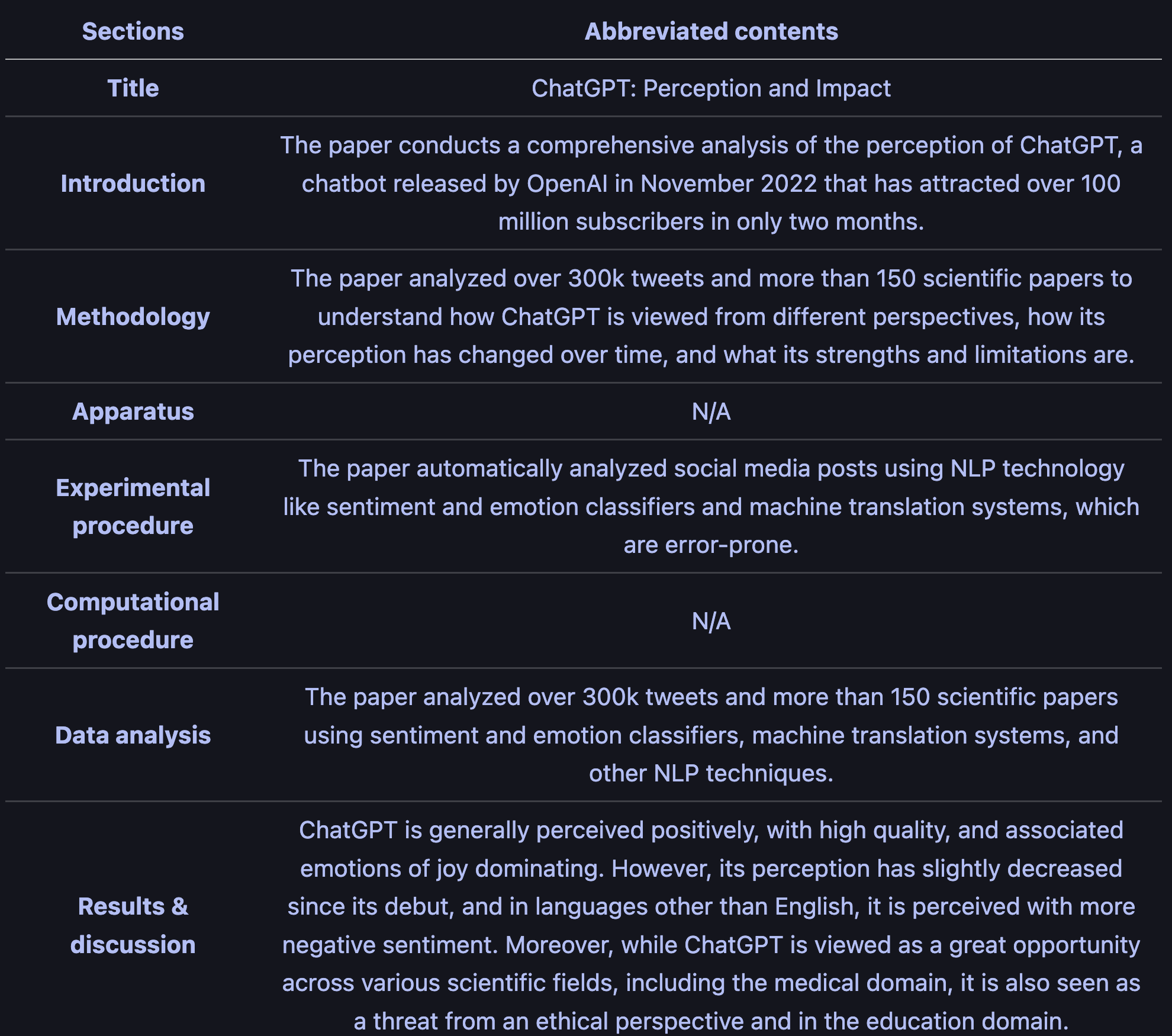
뿐만 아니라, htttps://chat.openai.com 에 접속하시면 현재까지의 작업 내용이 그대로 기록되어 있음을 확인할 수 있습니다. 이 상태에서 사이트에서 추가 프롬프팅을 진행하시는 것 또한 가능합니다 (이 논문에서 중요 결과만 보여줘, 이 논문에서 사용한 실험 기법을 보다 상세히 설명해줘, …)
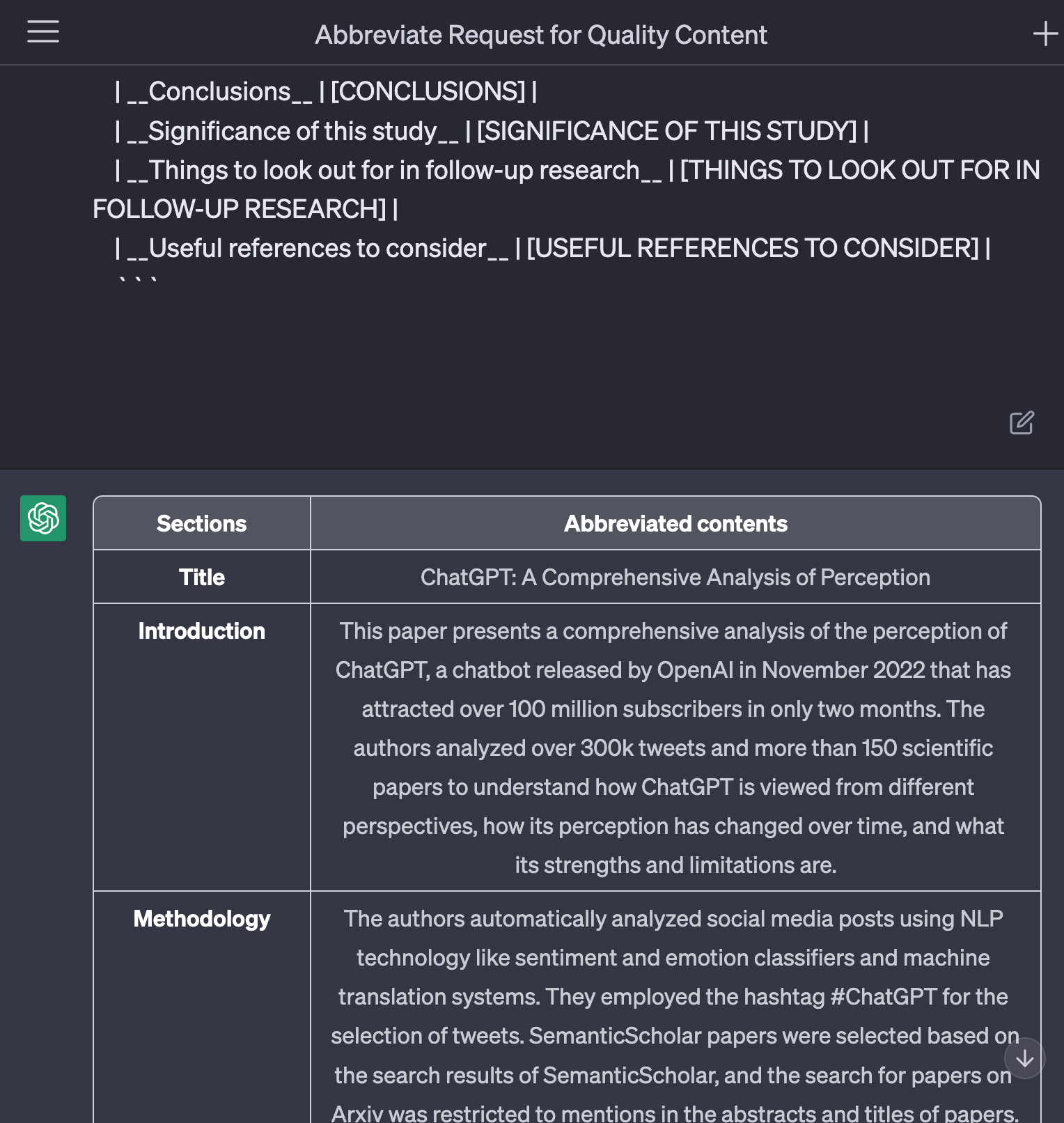
구동 영상 (.gif)
아래는 위 과정을 실제로 시연하는 영상입니다.
시간 상, OCR 스캐닝 과정을 스킵하기 위해 입력 파일을 .md로 준비하여 진행하였습니다.
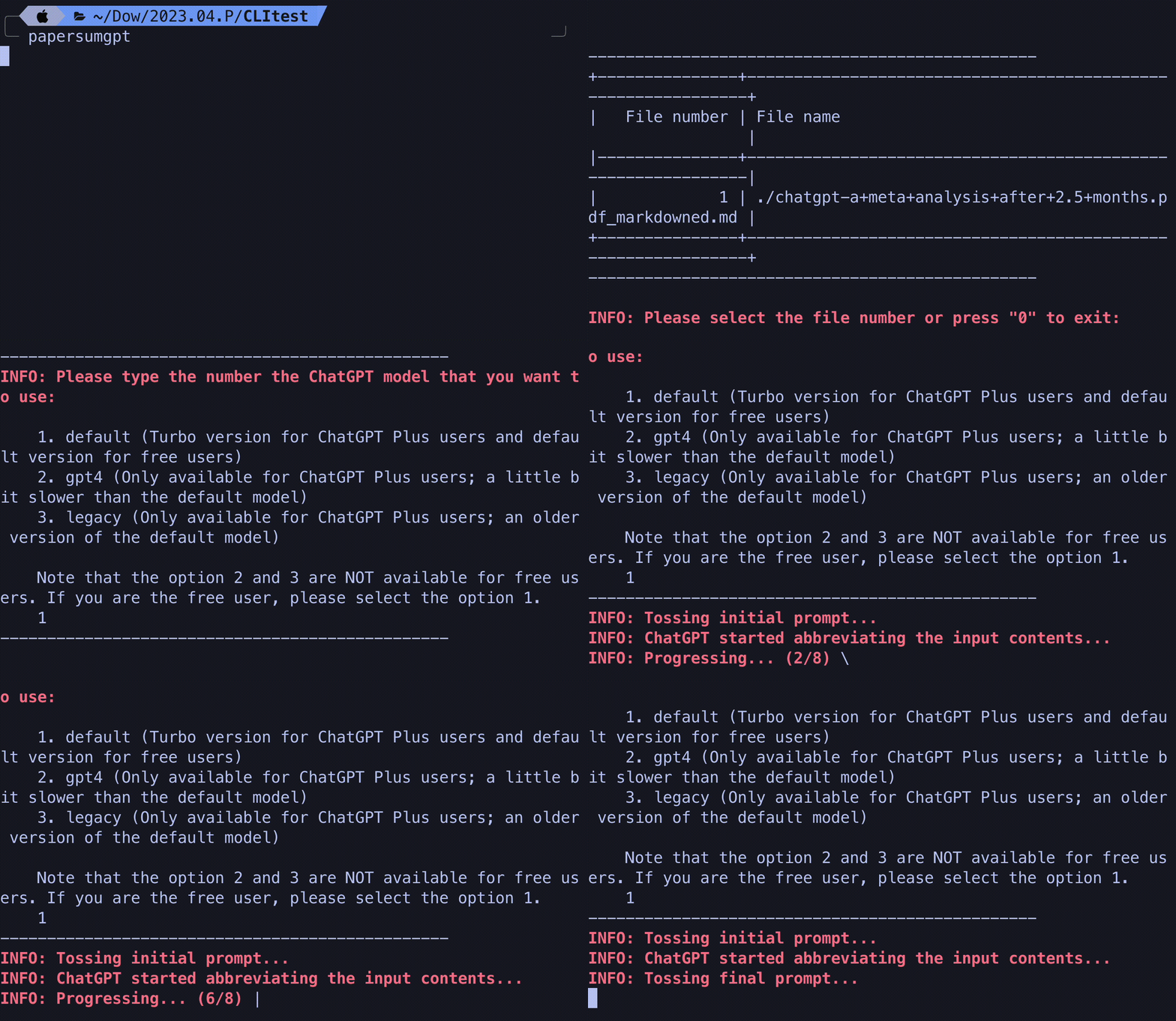
영상과 같은 과정을 거치면, 요약 결과 파일이 성공적으로 출력됩니다.
소스 코드 전문 (.py)
PaperSumGPT 소스코드 전문을 첨부합니다. 추후 활용에 도움되시길 바랍니다:)
# ------------------ Import libraries ------------------ #
import os
import glob
import pyfiglet
import numpy as np
from tabulate import tabulate
from chatgpt_wrapper import ChatGPT
from chatgpt_wrapper.config import Config

# Manipulating PDF
import cv2
import pytesseract as tess
from pdf2image import convert_from_path
from PIL import Image

# For spinning wheel
import sys
import time
import threading

# ------------------ Main code starts ------------------ #
# Print the title
os.system('cls' if os.name == 'nt' else 'clear')
title = pyfiglet.figlet_format('PaperSumGPT', font = 'small')
print('\n')
print(title+'\n')
print('\n')
print('------------------------------------------------')
print('If you have any questions, please send your questions to my email.')
print('\nOr, please suggest errors and areas that need updating.')
print('\n 📨 woo_go@yahoo.com')
print('\nVisit \033[;4mhttps://github.com/wjgoarxiv/papersumgpt\033[0m for more information.')
print('------------------------------------------------')

# Showing spinning_wheel effect

def spinning_wheel(message, stop_event):
    wheel = ['-', '\\', '|', '/']
    i = 0
    while not stop_event.is_set():
        sys.stdout.write('\r' + str(message) + ' ' + str(wheel[i % len(wheel)]))
        sys.stdout.flush()
        time.sleep(0.05)
        i += 1
    sys.stdout.write('\r' + ' ' * (len(message) + 2) + '\r')
    sys.stdout.flush()

def main():
    # Ask user if the brought input file is a markdown file or plain text file
    print('\n')
    file_type = int(input("""\033[31;1;mINFO: Please type the number the file type that you want to use:\033[0m

    1. Markdown (`.md`) file
    2. Plain text (`.txt`) file
    3. PDF (`.pdf`) file

    : """))
    print('\n')
    print('------------------------------------------------')

    # Print the list of files in the current directory
    if file_type == 1:
        file_list = glob.glob('./*.md')
        file_list = [file.split('\\')[-1] for file in file_list]
        file_list.sort()

    elif file_type == 2:
        file_list = glob.glob('./*.txt')
        file_list = [file.split('\\')[-1] for file in file_list]
        file_list.sort()

    elif file_type == 3:
        file_list = glob.glob('./*.pdf')
        file_list = [file.split('\\')[-1] for file in file_list]
        file_list.sort()

    # File not found error handling
    try:
        if len(file_list) == 0:
            raise FileNotFoundError
        else:
            pass

    # Alert the user
    except:
        print('\033[31;1;mERROR: There is no file in the current directory. Please check the current directory.\033[0m')
        print('------------------------------------------------')
        exit()

    # Print the list of files in the current directory
    file_num = []
    for i in range(len(file_list)):
        file_num.append(i+1)
    print(tabulate({'File number': file_num, 'File name': file_list}, headers='keys', tablefmt='psql'))
    print('------------------------------------------------')
    user_input = int(input('\n\033[31;1;mINFO: Please select the file number or press "0" to exit: \033[0m'))

    if user_input == 0:
        print("\033[31;1;4mINFO: Exiting the program.\033[0m")
        exit()
    else:
        try:
            print("\033[31;1;mINFO: The file name that would be utilized is: \033[0m", file_list[user_input-1])
        except:
            print("\033[31;1;mERROR: Your input number is out of range. Please check the file number.\033[0m")
            print("\033[31;1;mERROR: The program will stop.\033[0m")
            exit()

    # Ask user to turn on `verbose` mode.
    # If the user turns on `verbose` mode, the program will print the intermediate results.
    print('------------------------------------------------')
    verbose = input("\033[31;1;mINFO: Do you want to turn on `verbose` mode? If you turn on `verbose` mode, the program will print the intermediate results. (y/n): \033[0m")
    if verbose == 'y' or verbose == 'Y':
        verbose = True
    elif verbose == 'n' or verbose == 'N':
        verbose = False
    print('------------------------------------------------')

    # Ask user their desired ChatGPT model
    chatgpt_model = input("""\033[31;1;mINFO: Please type the number the ChatGPT model that you want to use: \033[0m

    1. default (Turbo version for ChatGPT Plus users and default version for free users)
    2. gpt4 (Only available for ChatGPT Plus users; a little bit slower than the default model)
    3. legacy (Only available for ChatGPT Plus users; an older version of the default model)

    Note that the option 2 and 3 are NOT available for free users. If you are the free user, please select the option 1.
    """)

    if chatgpt_model == '1':
        chatgpt_model = 'default'
    elif chatgpt_model == '2':
        chatgpt_model = 'gpt4'
    elif chatgpt_model == '3':
        chatgpt_model = 'legacy'
    else:
        print("\033[31;1;mERROR: Your input number is out of range. Please check the file number.\033[0m")
        print("\033[31;1;mERROR: The program will stop.\033[31;1;m")
        exit()
    print('------------------------------------------------')

    # ------------------ Convert pdf to markdown ------------------ #
    # This process requires following processes:
    # 1. Convert pdf to images
    # 2. Perform OCR
    # 3. Convert the images to a markdown file

    def pdf_to_images(pdf_file):
        return convert_from_path(pdf_file, 500)

    def process_image(image):
        # Convert PIL image to OpenCV image
        original_image = cv2.cvtColor(np.array(image), cv2.COLOR_RGB2BGR)
        gray_image = cv2.cvtColor(original_image, cv2.COLOR_BGR2GRAY)
        _, threshold_image = cv2.threshold(gray_image, 0, 255, cv2.THRESH_BINARY + cv2.THRESH_OTSU)

        rectangular_kernel = cv2.getStructuringElement(cv2.MORPH_RECT, (11, 11))
        dilated_image = cv2.dilate(threshold_image, rectangular_kernel, iterations=1)

        contours, hierarchy = cv2.findContours(dilated_image, cv2.RETR_TREE, cv2.CHAIN_APPROX_SIMPLE)
        copied_image = original_image.copy()

        ocr_text = ""

        for cnt in contours:
            x, y, w, h = cv2.boundingRect(cnt)
            cropped = copied_image[y:y + h, x:x + w]
            text = tess.image_to_string(cropped, config='--oem 3 --psm 1')
            ocr_text += text

        return ocr_text

    def perform_ocr(images):
        ocr_text = ""
        for i, image in enumerate(images):
            text = process_image(image)
            ocr_text += f"Page {i+1}:\n{text}\n\n"
        return ocr_text

    if file_type == 3:
        formatted_message = '\033[31;1;mINFO: Converting the PDF file to a markdown file...\033[0m'

        stop_event = threading.Event()
        spinner = threading.Thread(target=spinning_wheel, args=(formatted_message, stop_event))
        spinner.daemon = True
        spinner.start()

        pdf_text = perform_ocr(pdf_to_images(file_list[user_input-1]))

        with open(file_list[user_input-1] + '_markdowned.md', 'w', encoding='utf-8') as f:
            for line in pdf_text:
                f.write(line)

        file_list[user_input-1] = file_list[user_input-1] + '_markdowned.md'

        # ends the spinning wheel with stop_event.set()
        stop_event.set()
        spinner.join()

        print('\033[31;1;mINFO: The PDF file has been converted to a markdown file.\033[0m')
        print('------------------------------------------------')

    # ------------------ Function starts ------------------ #
    # Load config settings
    config = Config()
    config.set('chat.model', chatgpt_model)

    # Initialize ChatGPT
    bot = ChatGPT(config)

    # read input file
    with open(file_list[user_input-1], 'r') as f:
        input_text = f.read()

    # Ask user maximum length of input text (if don't know, just input 3000)
    max_length = 7000

    # truncate input text into smaller parts
    input_parts = [input_text[i:i+max_length] for i in range(0, len(input_text), max_length)]

    # define initial prompt message
    initial_prompt = "Please, act as 'High-quality content abbreviator'. Since you have the input limits (OpenAI limited your input limit), you have to firstly take the all the inputs iteratively. To do this, I've already truncated the long inputs into each subpart. You'll now have to take the inputs iteratively. The important thing is that you should NOT answer directly or respond to the previous message. Make sure that you have to accomplish the task when all the inputs are given. I'll let you know if all the inputs are given."

    # send initial prompt message to ChatGPT
    print("\033[31;1;mINFO: Tossing initial prompt...\033[0m")
    success, response, message = bot.ask(initial_prompt)
    if success:
        print(f"\033[31;1;mINFO: ChatGPT started abbreviating the input contents...\033[0m")
    else:
        raise RuntimeError(message)

    # initialize response list
    response_parts = []

    # define prompt message while iterating over input parts and send them to ChatGPT
    for i, part in enumerate(input_parts):
        if i == len(input_parts) - 1:
            # {i+1} / {len(input_parts)} is for the last part of the input contents
            prompt = f"This is the ({i+1} / {len(input_parts)}) part of the truncated input contents. And PLEASE! Do NOT answer and if you understood the input, just keep asking me to input the leftover contents.\n\n```\n{part}\n```\nThank you for taking all the inputs."
        else:
            prompt = f"This is the ({i+1} / {len(input_parts)}) part of the truncated input contents. And PLEASE! Do NOT answer and if you understood the input, just keep asking me to input the leftover contents.\n\n```\n{part}\n```"

        formatted_progressing = f"\033[31;1;mINFO: Progressing... ({i+1}/{len(input_parts)})\033[0m"
        stop_event_2 = threading.Event()
        spinner_2 = threading.Thread(target=spinning_wheel, args=(formatted_progressing, stop_event_2))
        spinner_2.daemon = True
        spinner_2.start()

        # send prompt message and prompt part to ChatGPT
        success, response, message = bot.ask(prompt)
        if success:
            response_parts.append(response)
        else:
            raise RuntimeError(message)

        # Handling the `verbose` mode
        if verbose == True:
            print(f"\033[31;1;mINFO: Tossed prompt in {i+1}/{len(input_parts)} part(s): {prompt}\033[0m")
            print(f"\033[31;1;mINFO: Response from ChatGPT: {response}\033[0m")
        else:
            pass

        stop_event_2.set()
        spinner_2.join()

    # define final prompt message
    final_prompt = """Now, all the inputs are given to you. You should combine and abbreviate all the inputs by fitting them into the following markdown format. The markdown format is as follows:

    ------ TEMPLATE STARTS ------

    # **[TITLE]**
    (Bring the title from the foremost heading in the document. The powerful hint is that the title comes before the people who wrote the document.)

    ## **Introduction**

    ## **Methodology**
    ### **Apparatus**
    ### **Experimental procedure**
    ### **Computational procedure (if exists)**
    ### **Data analysis**

    ## **Results & discussion**

    ## **Conclusions**

    ## **Significance of this study**

    ## **Things to look out for in follow-up research**

    ### **Useful references to consider**
    ...

    ------ TEMPLATE ENDS ------
    You have to write the outputs in a way that the readers can understand the contents easily. Don't forget to miss any important information from inputs. Detailed things that should be noticed would be included in the output (if possible, please bold them with `__BOLD__` or `**BOLD**` markdown marking for clear visibility). Consecutively, if possible, please find some useful references (including title and authors) from the Text or Markdown input file, and re-write them into `### Useful references to consider` subheader.
    Sort all these things into TABLE format; which will be efficient to understand what is what. Something like this:

    ```markdown
    | Sections | Abbreviated contents |
    | :----: | :----: |
    | __Title__ | [TITLE] |
    | __Introduction__ | [INTRODUCTION] |
    | __Methodology__ | [METHODOLOGY] |
    | __Experimental procedure__ | [EXPERIMENTAL PROCEDURE] |
    | __Computational procedure__ | [COMPUTATIONAL PROCEDURE] |
    | __Data analysis__ | [DATA ANALYSIS] |
    | __Results & discussion__ | [RESULTS & DISCUSSION] |
    | __Conclusions__ | [CONCLUSIONS] |
    | __Significance of this study__ | [SIGNIFICANCE OF THIS STUDY] |
    | __Things to look out for in follow-up research__ | [THINGS TO LOOK OUT FOR IN FOLLOW-UP RESEARCH] |
    | __Useful references to consider__ | [USEFUL REFERENCES TO CONSIDER] |
    ```

    """

    # send final prompt message to ChatGPT
    print("\033[31;1;mINFO: Tossing final prompt...\033[0m")

    # join response parts to form final response
    # If final response doesn't exist, use the last response part
    try:
        final_response = response_parts[-1]
    except:
        print("\033[31;1;mERROR: List index out of range. Exiting...\033[0m")
        sys.exit(1)

    success, response, message = bot.ask(final_prompt)
    if success:
        final_response = response  # Change this line
        print(f"INFO: Response from ChatGPT: {response}")
    else:
        raise RuntimeError(message)

    count_yes = 0
    again_final_prompt_base = "I think you are not done yet. Please input the leftover contents."

    # Create a variable to store the concatenated responses
    concatenated_responses = ""

    while True:
        user_input = input("\n\033[31;1;mINFO: Does the answer seem to be truncated? (y/n): \033[0m")
        if user_input.strip().lower() == "y":
            count_yes += 1
            print("\n\033[31;1;mINFO: Tossing final prompt again...\033[0m")
            last_response_part = response.strip().split()[-1] # Get the last word
            again_final_prompt = f"{again_final_prompt_base}" + "\n" + "However, keep in mind that you SHOULD NOT PRINT THE TEMPLATE that I gave you now on; JUST KEEP GENERATING from the truncated part. NEVER RESTART the conversation. Thank you."
            success, response, message = bot.ask(again_final_prompt)
            if success:
                # Find the overlapping part between the last response and the new response
                overlap_start = response.find(last_response_part)
                if overlap_start != -1:
                    response = response[overlap_start + len(last_response_part):]

                concatenated_responses += response  # Append the response without the overlapping part to the concatenated_responses
                print(f"\033[31;1;mINFO: Concatenated response from ChatGPT: {concatenated_responses}\033[0m")
            else:
                raise RuntimeError(message)
        elif user_input.strip().lower() == "n":
            break
        else:
            print("\033[31;1;mERROR: Invalid choice. Please try again.\033[0m")

    # Concatenate all the response parts upto the number of times the user says yes. Direction: end to start
    final_response = final_response + "\n" + concatenated_responses

    # prompt user to choose output format
    output_format = input("\n\033[31;1;mINFO Choose output format (stream / txt / md): \033[0m")

    # define maximum length of each response part to be printed at once
    max_response_length = 3000

    if output_format.lower() == "stream":
        # print response parts until the full response is generated
        i = 0
        while i < len(final_response):
            # print next response part
            response_part = final_response[i:i+max_response_length]
            print(response_part)
            i += len(response_part)

            # if there are more response parts, ask the user to continue
            if i < len(final_response):
                user_input = input("\033[31;1;mINFO: Press enter to continue or type 'quit' to exit: \033[0m")
                if user_input.strip().lower() == "quit":
                    break
                else:
                    print("\033[31;1;mERROR: Invalid choice. Quitting...\033[0m")

    # Export the file name as same as the input file name (`file_list[user_input-1]`)
    elif output_format.lower() == "txt":
        # write response to a text file
        with open("OUTPUT.txt", "w") as f:
            f.write(final_response)
        print("\033[31;1;mINFO: Output saved to OUTPUT.txt\033[0m")
    elif output_format.lower() == "md":
        # write response to a markdown file
        with open("OUTPUT.md", "w") as f:
            f.write(f"\n{final_response}\n")
        print("\033[31;1;mINFO: Output saved to OUTPUT.md\033[0m")
    else:
        print("\033[31;1;mERROR: Invalid output format selected. Please choose 'stream', 'txt', or 'md'.\033[0m")

if __name__ == "__main__":
    main()
참고 링크, 라이브러리, 리포지토리
📨 논문요약GPT (PaperSumGPT)에 관하여 개선점 및 궁금하신 점은 댓글, 혹은 woo_go@yahoo.com 이메일로 남겨주세요!
- https://github.com/wjgoarxiv/PaperSumGPT
- Your Personal Paper Summarizer: PaperSumGPT | Apr, 2023 | Better Programming (medium.com)
- pyfiglet - For generating ASCII art of the project name.
- tabulate - For creating clean and readable tables for the output.
- chatgpt_wrapper - An useful open-source unofficial Power CLI, Python API and Flask API that lets us interact programmatically with ChatGPT/GPT4.