
 글쓰기
글쓰기
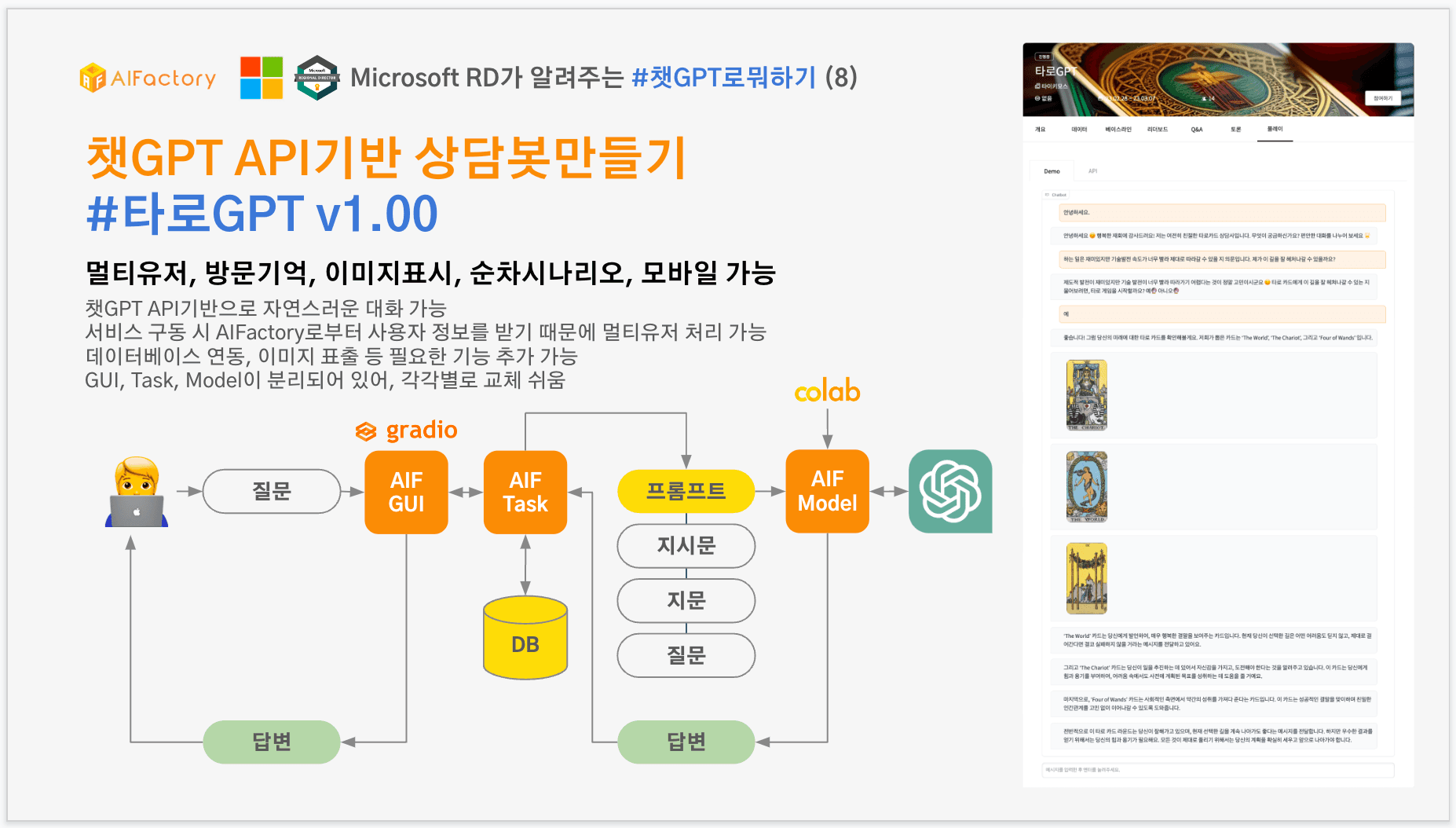
챗GPT API기반 상담봇 타로GPT(멀티유저, 방문기억, 이미지표시, 소스코드포함)
챗GPT API기반 상담봇만들기 1탄으로 타로GPT v1.00을 소개합니다. 타로GPT를 처음 구상했을 당시에는 프롬프트 엔지니어링만 생각했었는 데, 얼마 전 ChatGPT API가 나왔으므로, 이를 활용하여 자체 GUI를 가진 타로GPT가 탄생하게 되었습니다. 바로 사용해보기사용법은 간단합니다. 상단에 [플레이]탭을 눌러서, 질문을 입력하면 이어서 타로GPT가 주도적으로 진행합니다. (단 회원로그인이 필요합니다.) 현재 무료버전이라 ChatGPT API 사용량도 정해놓았기 때문에 경우에 따라 제대로 작동을 하지 않을 수도 있습니다.아래는 "인사 > 질문 > 이해 및 진행여부 > 타로카드 선택 > 해석" 과정 전체에 대해 표시한 것입니다. 플레이 탭에서 상담 받아보실 수 있으니 지금 바로 해보세요~친절한 타로GPT이전 방문 메시지가 데이터베이스에 저장되어 있기 때문에 이를 기반으로 메시지를 생성할 수 있습니다.태스크과 모델 분리하기태스크와 모델을 분리하여 어플리케이션 시나리오 처리와 인공지능 모델을 나누어서 관리할 수 있습니다. 추후 ChatGPT가 아닌 LLM 모델을 도입하고 싶다면, 모델 부분만 교체하면 됩니다.태스크인공지능 모델을 제외한 시나리오 처리 및 GUI 제공을 담당합니다.태스크의 전체 소스코드를 첨부합니다. 코랩에서 로컬에서 구동하려면 환경설정 등 몇가지 설정이 추가로 필요합니다. 수정이 필요한 부분을 “#수정필요”라고 표시해두었습니다.<code class="language-python">import os import gradio as gr import numpy as np import requests from PIL import Image from skimage import io import plotly.express as px import plotly.graph_objects as go from datetime import datetime import sqlite3 api_env = os.environ['API_ADDRESS'] #수정필요 demo_id = os.environ['DEMOAPI_ID'] #수정필요 def init_db(): conn = sqlite3.connect('./user_message.db') curs = conn.cursor() curs.execute('CREATE TABLE IF NOT EXISTS message_record(id INTEGER PRIMARY KEY AUTOINCREMENT, user_id TEXT, create_datetime TEXT, message TEXT)') curs.execute('CREATE TABLE IF NOT EXISTS message_record_log(id INTEGER PRIMARY KEY AUTOINCREMENT, user_id TEXT, create_datetime TEXT, message TEXT)') conn.commit() conn.close() def add_message(user_id, message): conn = sqlite3.connect('./user_message.db') curs = conn.cursor() curs.execute("INSERT INTO message_record VALUES (null, ?, ?, ?)", (user_id, str(datetime.now()), message)) conn.commit() conn.close() conn = sqlite3.connect('./user_message.db') curs = conn.cursor() curs.execute("INSERT INTO message_record_log VALUES (null, ?, ?, ?)", (user_id, str(datetime.now()), message)) conn.commit() conn.close() def get_message_history(user_id): conn = sqlite3.connect('./user_message.db') curs = conn.cursor() query = curs.execute("SELECT message from message_record where user_id = ?", (user_id,)) ret = query.fetchall() conn.close() return ret def get_message_log_history_count(user_id): conn = sqlite3.connect('./user_message.db') curs = conn.cursor() query = curs.execute("SELECT count(*) from message_record_log where user_id = ?", (user_id,)) ret = query.fetchone()[0] conn.close() return ret def get_instruction_message_count(user_id): conn = sqlite3.connect('./user_message.db') curs = conn.cursor() query = curs.execute("SELECT count(*) from message_record where user_id = ? and message LIKE ?", (user_id, "%system%")) ret = query.fetchone()[0] conn.close() return ret def del_message_history(user_id): conn = sqlite3.connect('./user_message.db') curs = conn.cursor() curs.execute("DELETE FROM message_record WHERE user_id = ?", (user_id,)) conn.commit() conn.close() def sendResultForDemoAPI(error_msg): res = requests.post(api_env, json= {'dtype': 2, 'id': demo_id, 'error': error_msg}) return def sendResultForDemoAPIWithID(demoid, error_msg): res = requests.post(api_env, json= {'dtype': 2, 'id': demo_id, 'error': error_msg}) return tarot_card_list = [ [1, 'The Fool', '9/90/RWS_Tarot_00_Fool'], [2, 'The Magician', 'd/de/RWS_Tarot_01_Magician'], [3, 'The High Priestess', '8/88/RWS_Tarot_02_High_Priestess'], [4, 'The Empress', 'd/d2/RWS_Tarot_03_Empress'], [5, 'The Emperor', 'c/c3/RWS_Tarot_04_Emperor'], [6, 'The Hierophant', '8/8d/RWS_Tarot_05_Hierophant'], [7, 'The Lovers', '3/3a/TheLovers'], [8, 'The Chariot', '9/9b/RWS_Tarot_07_Chariot'], [9, 'Strength', 'f/f5/RWS_Tarot_08_Strength'], [10, 'The Hermit', '4/4d/RWS_Tarot_09_Hermit'], [11, 'Wheel of Fortune', '3/3c/RWS_Tarot_10_Wheel_of_Fortune'], [12, 'Justice', 'e/e0/RWS_Tarot_11_Justice'], [13, 'The Hanged Man', '2/2b/RWS_Tarot_12_Hanged_Man'], [14, 'Death', 'd/d7/RWS_Tarot_13_Death'], [15, 'Temperance', 'f/f8/RWS_Tarot_14_Temperance'], [16, 'The Devil', '5/55/RWS_Tarot_15_Devil'], [17, 'The Tower', '5/53/RWS_Tarot_16_Tower'], [18, 'The Star', 'd/db/RWS_Tarot_17_Star'], [19, 'The Moon', '7/7f/RWS_Tarot_18_Moon'], [20, 'The Sun', '1/17/RWS_Tarot_19_Sun'], [21, 'Judgment', 'd/dd/RWS_Tarot_20_Judgement'], [22, 'The World', 'f/ff/RWS_Tarot_21_World'], [23, 'Ace of Wands', '1/11/Wands01'], [24, 'Two of Wands', '0/0f/Wands02'], [25, 'Three of Wands', 'f/ff/Wands03'], [26, 'Four of Wands', 'a/a4/Wands04'], [27, 'Five of Wands', '9/9d/Wands05'], [28, 'Six of Wands', '3/3b/Wands06'], [29, 'Seven of Wands', 'e/e4/Wands07'], [30, 'Eight of Wands', '6/6b/Wands08'], [31, 'Nine of Wands', '4/4d/Tarot_Nine_of_Wands'], [32, 'Ten of Wands', '0/0b/Wands10'], [33, 'Page of Wands', '6/6a/Wands11'], [34, 'Knight of Wands', '1/16/Wands12'], [35, 'Queen of Wands', '0/0d/Wands13'], [36, 'King of Wands', 'c/ce/Wands14'], [37, 'Ace of Cups', '3/36/Cups01'], [38, 'Two of Cups', 'f/f8/Cups02'], [39, 'Three of Cups', '7/7a/Cups03'], [40, 'Four of Cups', '3/35/Cups04'], [41, 'Five of Cups', 'd/d7/Cups05'], [42, 'Six of Cups', '1/17/Cups06'], [43, 'Seven of Cups', 'a/ae/Cups07'], [44, 'Eight of Cups', '6/60/Cups08'], [45, 'Nine of Cups', '2/24/Cups09'], [46, 'Ten of Cups', '8/84/Cups10'], [47, 'Page of Cups', 'a/ad/Cups11'], [48, 'Knight of Cups', 'f/fa/Cups12'], [49, 'Queen of Cups', '6/62/Cups13'], [50, 'King of Cups', '0/04/Cups14'], [51, 'Ace of Swords', '1/1a/Swords01'], [52, 'Two of Swords', '9/9e/Swords02'], [53, 'Three of Swords', '0/02/Swords03'], [54, 'Four of Swords', 'b/bf/Swords04'], [55, 'Five of Swords', '2/23/Swords05'], [56, 'Six of Swords', '2/29/Swords06'], [57, 'Seven of Swords', '3/34/Swords07'], [58, 'Eight of Swords', 'a/a7/Swords08'], [59, 'Nine of Swords', '2/2f/Swords09'], [60, 'Ten of Swords', 'd/d4/Swords10'], [61, 'Page of Swords', '4/4c/Swords11'], [62, 'Knight of Swords', 'b/b0/Swords12'], [63, 'Queen of Swords', 'd/d4/Swords13'], [64, 'King of Swords', '3/33/Swords14'], [65, 'Ace of Pentacles', 'f/fd/Pents01'], [66, 'Two of Pentacles', '9/9f/Pents02'], [67, 'Three of Pentacles', '4/42/Pents03'], [68, 'Four of Pentacles', '3/35/Pents04'], [69, 'Five of Pentacles', '9/96/Pents05'], [70, 'Six of Pentacles', 'a/a6/Pents06'], [71, 'Seven of Pentacles', '6/6a/Pents07'], [72, 'Eight of Pentacles', '4/49/Pents08'], [73, 'Nine of Pentacles', 'f/f0/Pents09'], [74, 'Ten of Pentacles', '4/42/Pents10'], [75, 'Page of Pentacles', 'e/ec/Pents11'], [76, 'Knight of Pentacles', 'd/d5/Pents12'], [77, 'Queen of Pentacles', '8/88/Pents13'], [78, 'King of Pentacles', '1/1c/Pents14'] ] card_name_list = [] for _, card_name, _ in tarot_card_list: card_name_list.append("'" + card_name + "'") card_names = ','.join(card_name_list) instruction_message_list = [ "당신은 친절한 타로카드상담사입니다. 사용자에게 반갑게 인사하고 질문을 편안하게 유도하는 말을 합니다. 문장에 이모지를 추가합니다.", "받은 [질문]에 대해서 공감한 뒤, 타로 게임을 시작해도 되는 지 '예' 또는 '아니오'로 대답할 수 있도록 물어봅니다. 그 외의 다른 질문은 하지 않습니다. 이 때 타로 카드는 아직 뽑지 않습니다. 문장에 이모지를 추가합니다.", "사용자가 시작을 원치 않으면 상담을 중단합니다. 그렇지 않다면, [" + card_names + "]에서 임의의 3장의 카드를 고른 뒤, 카드 이름을 한 문장씩 따로 작성합니다.\n 받은 [질문]에 맞게 고른 카드를 순서대로 해석한 뒤, 종합적으로 해석한 내용을 깊이있고 친절하게 작성합니다. 문장에 이모지를 추가합니다." ] used_cards = [] def process_scenario(user_id, user_message, instruction_message): global pred_func add_message(user_id, str({"role" : "user", "content": user_message})) if len(instruction_message) > 0: add_message(user_id, str({"role" : "system", "content": instruction_message})) all_message = get_message_history(user_id) query_message = [] for msg in all_message: query_message.append(eval(msg[0])) assistant_message = pred_func(query_message) add_message(user_id, str({"role" : "assistant", "content": assistant_message})) return assistant_message def get_pic(input_text): ret = [] for card_num, card_name, card_url in tarot_card_list: if card_name in input_text and card_name not in used_cards: ret.append(''.format(card_name, card_url)) used_cards.append(card_name) return ret get_window_url_params = """ function(url_params, chat_state) { const params = new URLSearchParams(window.location.search); url_params = Object.fromEntries(params); return [url_params, chat_state, chat_state]; } """ def demo_load(url_params, chat_state): user_id = url_params['email'] del_message_history(user_id) chat_state, _ = predict_demo(url_params, "안녕하세요.", chat_state) return url_params, chat_state, chat_state def predict_demo(url_params, user_input, state): user_id = url_params['email'] instruction_message = '' instruction_message_idx = get_instruction_message_count(user_id) history_count = get_message_log_history_count(user_id) if instruction_message_idx < len(instruction_message_list): if instruction_message_idx == 0: additional_comment = '첫 방문한 사용자이니 첫방문에 대해 감사의 말을 작성합니다.' if history_count > 0: additional_comment = '재방문한 사용자이니 다시 찾아온 것에 대해 감사의 말을 작성합니다.' instruction_message = additional_comment + instruction_message_list[instruction_message_idx] else: instruction_message = instruction_message_list[instruction_message_idx] response = process_scenario(user_id, user_input, instruction_message) state = state + [(user_input, None)] response_items = response.split('\n\n') for item in response_items: state = state + [(None, item)] pic_list = get_pic(item) for pic_item in pic_list: state = state + [(None, pic_item)] return state, state def demo_from_submission(key, pyname, func): global pred_func init_db() try: pred_func = func with gr.Blocks() as demo: chatbot = gr.Chatbot() url_params = gr.JSON({'email':'tykim@aifactory.page'}, #수정필요 visible=False, label="URL Params") chat_state = gr.State([]) with gr.Row(): user_input = gr.Textbox(show_label=False, placeholder="메시지를 입력한 후 엔터를 눌려주세요.").style(container=False) demo.load(demo_load, inputs = [url_params, chat_state], outputs = [url_params, chatbot, chat_state], _js = get_window_url_params) user_input.submit(predict_demo, inputs=[url_params, user_input, chat_state], outputs=[chatbot, chat_state]) user_input.submit(lambda :"", None, user_input) demo.launch(server_name="0.0.0.0", debug=True) except Exception as e: sendResultForDemoAPI(str(e))</code>ModelModel 부분에서는 predict 함수만 정의하고, aif 패키지를 통해서 aif로 자신의 모델을 전달할 수 있습니다.<code class="language-python">def predict(input_message): import openai import time openai.api_key = "OpenaAI 사용자키" start = time.time() res = openai.ChatCompletion.create(model="gpt-3.5-turbo", messages=input_message) ret = res['choices'][0]['message']['content'] return ret import aifactory.grade as aif import ipynbname import os if __name__ == "__main__": filename = '' try: filename = ipynbname.name() except Exception as e: filename = os.path.basename(__file__) print(filename) aif.submit("AIFactory 태스크키",filename, predict)</code>태스크과 모델 연동로컬에서 시행하실 때는 아래와 같이 함수를 호출하면 됩니다.<code class="language-python">if __name__ == "__main__": demo_from_submission('', '', predict)</code>AIFactory 플랫폼 이용현재 데모는 AIFactory 플랫폼 상에서 서비스가 제공되고 있습니다. AIFactory는 GCP 기반으로 MLOps로 구성되어 AI 모델을 빠르고 안정적으로 온보딩 절차를 수행할 수 있습니다. ChatGPT 활용은 물론 다양한 AI 모델과의 연동을 위한 준비가 되어 있으니 자신의 모델을 만들고 싶거나 서빙하고 싶은 분은 연락주세요~그리고 3월, 4월에 있을 챗GPT 러닝데이 및 해커톤 정보도 드립니다.챗GPT 러닝데이 & 해커톤 - 전과정 무료3월 한 달동안 매주 화요일 저녁에 챗GPT를 이해하기 위한 기초 내용 및 이론을 배우고, 실습을 해본 뒤 실제 개발과 활용을 어떻게 해야할 지 살펴봅니다. 이어서 4월에는 지금까지 배운 것들을 활용하여 프롬프트, 확장앱, API 기반 서비스를 만드는 해커톤을 진행합니다. 챗GPT에 관심있는 기관 혹은 서비스나 기술을 알리고싶은 기업 후원을 받고 있으니 아래 링크에서 신청 부탁드립니다.챗GPT 해커톤 후원사 모집 (~ 4월 18일 23시) >> https://aifactory.space/competition/detail/2292챗GPT 해커톤 참가자 모집 (~ 4월 18일 23시) >> https://aifactory.space/competition/detail/2290챗GPT 러닝데이 안내 (3월달 매주 화요일 저녁 7시~9시 온라인) >> https://aifactory.space/learning/detail/2291문의인공지능팩토리 김태영 대표이사마이크로소프트 Regional Director이메일 : tykim@aifactory.page
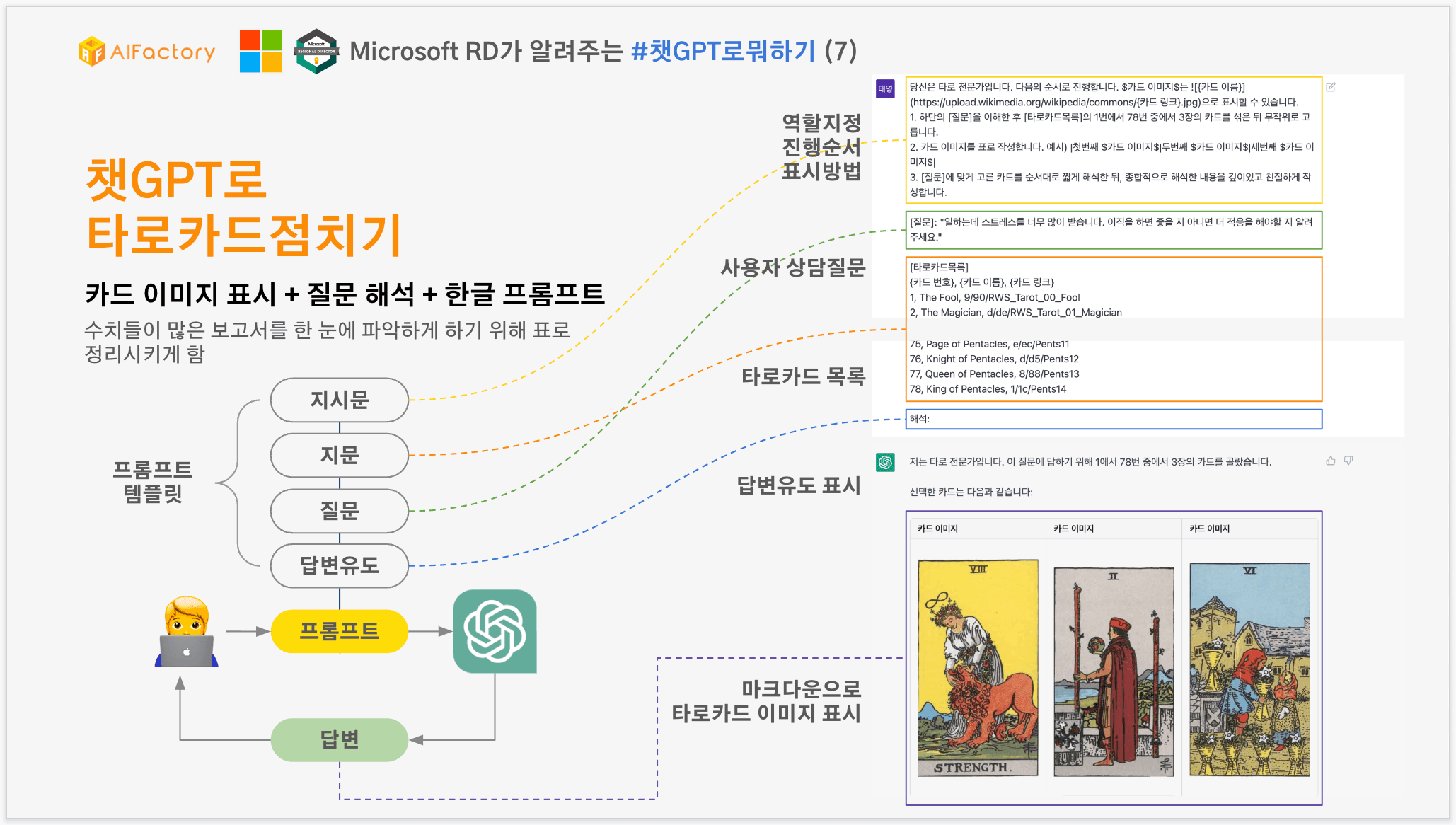
챗GPT로 타로카드점치기 (카드 이미지 표시 + 질문 해석 + 한글 프롬프트)
챗GPT로 타로카드 점치는 것도 가능할까? 라고 생각하던 중에 찾아보니 몇가지 프롬프트를 알게되었는데요. 이 중에 타로카드 이미지를 표시해주는 프롬프트를 https://www.chainbrainai.com/ 에서 “Tarot Card Reading (with embedded card images)”에서 찾았습니다. 이를 기반으로 몇 가지 더 기능을 추가하고 시도해보고 싶었던 것이 있었는데요. 아래 요구사항을 만족하는 프롬프트를 만들고 싶었습니다.한글 프롬프트로 성공할 것카드 이미지를 표형식으로 이쁘게 보여줄 것질문을 이해하고, 질문에 대한 카드 해석을 해야할 것여러번 시도하더라도 제대로 나올 것이러한 요구사항을 만족하기 위해서 각각 단위 기능을 테스트 한 후, 최종으로 아래와 같이 프롬프트를 설계했습니다.프롬프트 설계일반적으로 프롬프트는 지시문, 지문, 질문, 답변유도 등으로 구성되는데요. 각각 아래와 같이 지정했습니다.지시문: 역할지정과 진행순서 그리고 표시방법을 지정합니다.질문: 사용자의 질문을 넣습니다.지문: 타로카드 목록을 나열합니다. 이미지를 표시하기 위해 파싱을 해야하므로 CSV 형태로 구성했습니다.답변유도 표시: “해석:”이라고 명시하면, 이후에는 챗GPT가 알아서 답변을 해줍니다. 답변유도를 하지 않으면, 자신에게 무엇을 묻는 지 몰라 되묻거나 제대로 동작을 하지 않을 수 있습니다.결과 화면은 아래와 같습니다. 실제로 타로점보든 카드를 뒤집어서 보여주듯 한 장씩 표시되네요.프롬프트와 답변이번 사용된 프롬프트 및 답변을 가지고 왔습니다. 팁이나 추가 설명이 필요할 경우 아래 서식을 이용했습니다. 팁 혹은 추가설명프롬프트 설명에서는 팁이나 추가설명 때문에 복사 붙이기로 사용하시기에는 불편하실 것 같아 전체 프롬프트 원본은 “데이터”탭에 업로드 해두었습니다. “챗GPT로 타로카드 점치기 프롬프트.txt”를 클릭하여 다운로드 받으시면 됩니다.그럼 프롬프트를 살펴보겠습니다. 당신은 타로 전문가입니다. 역할을 지정합니다. 굳이 하지 않아도 되긴 합니다.다음의 순서로 진행합니다. $카드 이미지$는 으로 표시할 수 있습니다.이미지 표시를 위해서 마크다운 방식을 취했습니다. 1. 하단의 [질문]을 이해한 후 [타로카드목록]의 1번에서 78번 중에서 3장의 카드를 섞은 뒤 무작위로 고릅니다. 2. 카드 이미지를 표로 작성합니다. 예시) |첫번째 $카드 이미지$|두번째 $카드 이미지$|세번째 $카드 이미지$| 3. [질문]에 맞게 고른 카드를 순서대로 짧게 해석한 뒤, 종합적으로 해석한 내용을 깊이있고 친절하게 작성합니다.프롬프트에 짧게 해석해달라고 명시했습니다. 명시하지 않으면 카드 하나하나 설명을 장황하게 하고는 종합해석 중에 그만두는 경우가 발생합니다.[질문]: "일하는데 스트레스를 너무 많이 받습니다. 이직을 하면 좋을 지 아니면 더 적응을 해야할 지 알려주세요."사용자 질문을 가장 마지막에 나오는 편이 사용하기에는 편하지만, 지문이 현재 길어서 제대로 질문을 인식하지 않아서 초반부에 삽입하였습니다.[타로카드목록] {카드 번호}, {카드 이름}, {카드 링크} 1, The Fool, 9/90/RWS_Tarot_00_Fool 2, The Magician, d/de/RWS_Tarot_01_Magician 3, The High Priestess, 8/88/RWS_Tarot_02_High_Priestess …(중략) 원본은 데이터탭에서 다운로드 가능합니다.76, Knight of Pentacles, d/d5/Pents12 77, Queen of Pentacles, 8/88/Pents13 78, King of Pentacles, 1/1c/Pents14해석:답변 유도 지시어를 추가했습니다.저는 타로 전문가입니다. 이 질문에 답하기 위해 1에서 78번 중에서 3장의 카드를 골랐습니다.첫번째 주문이 질문을 이해하라는 것이었습니다. 이 주문이 없다면, 질문과 상관없이 카드를 뽑고 그냥 카드만 해석하는 경우가 있습니다.선택한 카드는 다음과 같습니다:이미지로 표시하기 위해서는 마크다운 형식으로 표시해야합니다. 단 이미지는 이미 웹상에서 가지고 올 수 있는 링크여야 합니다.카드 이미지카드 이미지카드 이미지선택한 카드를 짧게 해석하면 다음과 같습니다:Strength: 이 카드는 여러 가지 문제를 해결하는 데 필요한 강한 의지와 인내력을 상징합니다. 이 카드는 이 질문의 대답을 찾는 사람에게 일을 하는 데 필요한 인내심을 부여할 수 있습니다.Two of Wands: 이 카드는 결정을 내리기 위해 선택의 기로에 선 상황을 나타냅니다. 그러나 이 카드는 또한 긍정적인 선택이 가능하다는 것을 암시합니다. 새로운 전망을 탐색하고 싶은 욕구가 있다면 이 카드는 이직을 고려해볼 수도 있다는 것을 시사합니다.Six of Cups: 이 카드는 과거의 추억과 연관된 사람들과의 관계를 나타냅니다. 이 카드는 새로운 일을 시작하기 전에 과거의 일을 마음 속에서 해결해야 한다는 것을 암시합니다. 이직을 결정하려면 이전의 직장에서의 경험들을 돌아보고 이를 해결해 나가야할 필요성이 있을 수 있습니다.이 카드들을 종합적으로 해석해보면, 이직을 고민하는 상황에서는 이전의 일들을 해결하고, 긍정적인 선택이 가능한 상황에서 새로운 전망을 탐색해봐야 할 것입니다. 이 질문의 대답은 그 사람이 직장에서 경험하는 스트레스를 덜어주지는 않지만, 이전의 문제를 해결하고 새로운 전망을 향해 나아갈 수 있는 자신감을 부여할 수 있습니다.챗GPT로뭐하기 시리즈전체 시리즈는 타이키모스 블로그에서 보실 수 있습니다. >> https://tykimos.github.io/그리고 3월, 4월에 있을 챗GPT 러닝데이 및 해커톤 홍보도 함께 드립니다.챗GPT 러닝데이 & 해커톤 - 전과정 무료3월 한 달동안 매주 화요일 저녁에 챗GPT를 이해하기 위한 기초 내용 및 이론을 배우고, 실습을 해본 뒤 실제 개발과 활용을 어떻게 해야할 지 살펴봅니다. 이어서 4월에는 지금까지 배운 것들을 활용하여 프롬프트, 확장앱, API 기반 서비스를 만드는 해커톤을 진행합니다. 챗GPT에 관심있는 기관 혹은 서비스나 기술을 알리고싶은 기업 후원을 받고 있으니 아래 링크에서 신청 부탁드립니다.챗GPT 해커톤 후원사 모집 (~ 4월 18일 23시) >> https://aifactory.space/competition/detail/2292챗GPT 해커톤 참가자 모집 (~ 4월 18일 23시) >> https://aifactory.space/competition/detail/2290챗GPT 러닝데이 안내 (3월달 매주 화요일 저녁 7시~9시 온라인) >> https://aifactory.space/learning/detail/2291문의인공지능팩토리 김태영 대표이사tykim@aifactory.page